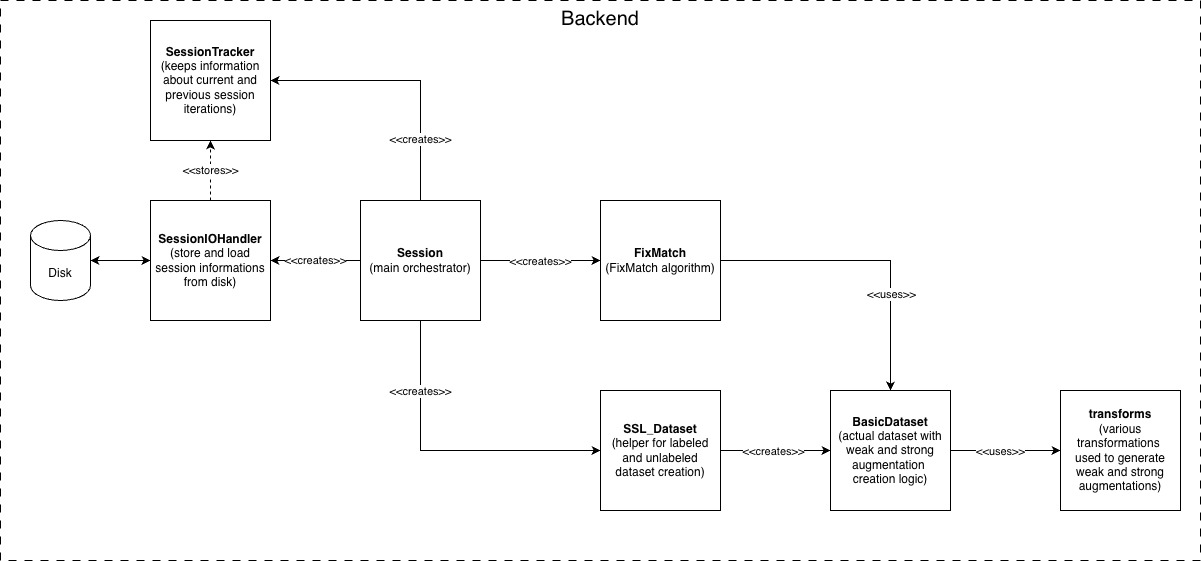
Architecture
Overview
AnomalyMatch separates backend (ML pipeline) from frontend (Jupyter UI):
anomaly_match/          Core ML library (models, datasets, pipeline, I/O)
anomaly_match_ui/       Jupyter UI (screens, widgets, BackendInterface)
subprocess_scripts/     Prediction & training subprocesses
The BackendInterface acts as a single gateway between UI and backend —
all session operations are accessible without the UI for headless or scripted
use (see Headless Mode).
Ecosystem
AnomalyMatch relies on two companion libraries for image loading and normalisation:
                ┌──────────────┐
                │ AnomalyMatch │
                └──┬────────┬──┘
      Training/    │        │  Streaming
      Prediction   │        │  Prediction
                   ▼        ▼
            ┌──────────┐ ┌────────┐
            │ fitsbolt │ │ cutana │
            └──────────┘ └───┬────┘
                 ▲           │
                 └───────────┘
              (normalisation)
- fitsbolt handles FITS/image loading and normalisation (stretching, channel combination, dtype conversion).
- Cutana orchestrates cutout extraction from FITS tiles and delegates normalisation to fitsbolt.
Because the training and Cutana streaming paths both normalise through fitsbolt, a source scored by streaming prediction is normalised exactly as it would have been in training.
Core Components
| Component | Module | Purpose |
|---|---|---|
| Session | anomaly_match.pipeline.session |
Orchestrates workflow: dataset, model, training |
| FixMatch | anomaly_match.models.FixMatch |
Semi-supervised learning with dual-model EMA |
| SSL_Dataset | anomaly_match.datasets.SSL_Dataset |
Labeled/unlabeled data separation |
| BackendInterface | anomaly_match_ui.utils.backend_interface |
UI-session decoupling layer |
| AnomalyScoreDB | anomaly_match.prediction.AnomalyScoreDB |
SQLite store for prediction scores |
| Transforms | anomaly_match.image_processing.transforms |
Weak/strong/prediction augmentations |
Data Flow
Training (subprocess)
Config pickle + labels CSV  ->  subprocess_scripts/training_process.py
                                    -> SSL_Dataset -> FixMatch.train()
                                    -> Save model checkpoint
Scoring / Prediction (subprocess)
Active Learning Cycle
TrainingSetupScreen -> [config + labels]
    -> Training subprocess -> model checkpoint
    -> Scoring subprocess  -> AnomalyScoreDB
    -> Gallery UI (browse, label via 3-way toggles)
    -> Merge labels into CSV -> [retrain]
UI Screens
| Screen | Purpose |
|---|---|
| MainMenuScreen | Entry point with Training / Prediction buttons |
| TrainingSetupScreen | Select source folder, labels, model, normalisation |
| TrainingScreen | State machine: TRAINING -> SCORING -> BROWSING -> RETRAIN |
| PredictionSetupScreen | Select search folder, model, normalisation |
| PredictionScreen | Live prediction monitoring with gallery |
| ImageDetailScreen | Full-size image viewer with transform controls |
Design Patterns
- Subprocess architecture: Training and scoring run as isolated child processes for memory safety and UI responsiveness. Progress is monitored via JSON-lines files (training) or database polling (scoring).
- BackendInterface: Static class wrapping all Session methods. UI components never import Session directly. Enables headless operation and testing.
- GalleryScreenBase ABC: Shared base class for PredictionScreen and TrainingScreen. Provides DB polling, pagination, sort, histogram, and image prefetch infrastructure.
- Dual Model:
train_model(backprop) +eval_model(EMA) for stable predictions. - DB-backed gallery: Large datasets loaded on-demand via AnomalyScoreDB queries and ImageCache, not in-memory arrays.
- Session Persistence: State saved to
anomaly_match_results/sessions/{name}_{timestamp}/.
Architecture diagram